
THE MOVING PARTS
Signals change by the minute
- • Players join and leave the current room
- • Friends move online and offline
- • Privacy and membership affect eligibility
- • Sender sessions, rate limits, and service health shift
AUTOMATIC INVITES · EXPLAINED IN REAL TIME
Queue room arrivals for group invites and online friends for your current instance—from one native Windows control center with separate workflow health, readable outcomes, and VRChat-aware cooldowns.
 VRC Auto Invite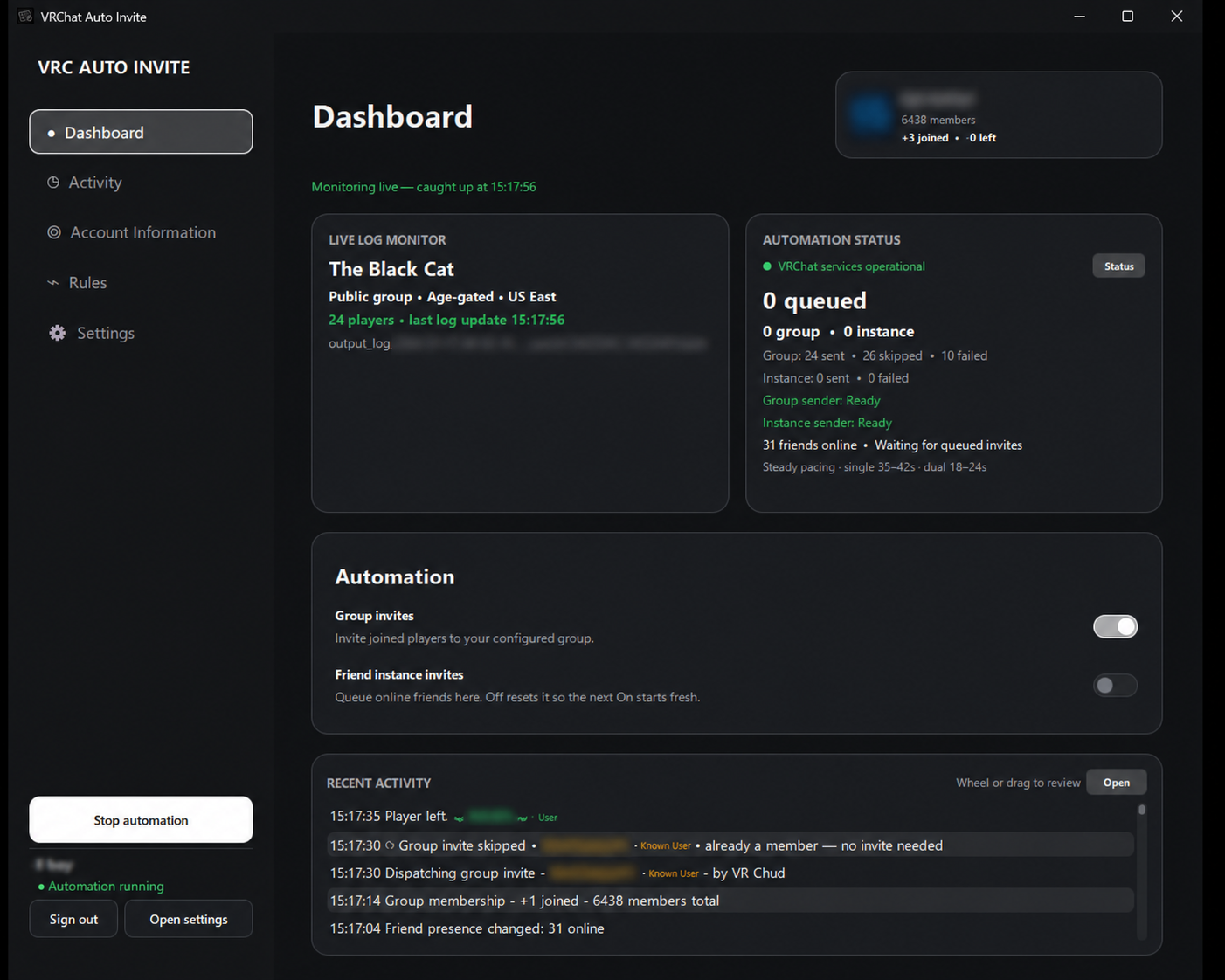
AUTOMATION WITHOUT A BLACK BOX
Rooms change. Friends come online. Accounts cool down. Recipients can already be members, already have an invite, or be ineligible. VRC Auto Invite keeps those moving parts visible instead of collapsing them into one mystery counter.
THE MOVING PARTS
THE CONTROL CENTER
THE CURRENT PRODUCT
Built for community hosts who want automation to remain understandable, interruptible, and tied to the room they are actually running.
GROUP + FRIEND-INSTANCE WORKFLOWS
People who join the current room can enter the group-invite queue. Eligible friends who are already online—or come online later—can enter the friend-instance queue when you enable it. Each workflow keeps its own queue, results, pacing, and cooldown state.
OUTCOME INTELLIGENCE
See who was queued, which sender acted, and whether VRChat reported sent, already invited, already a member, declined, ineligible, rate-limited, unavailable, or uncertain. Recipient-specific outcomes move on without poisoning the entire sender.
INDEPENDENT SENDER HEALTH
Use your primary account for friend-instance invites and optionally dedicate a secondary account to group invites. Each physical sender keeps its own readiness and server-directed cooldown; a configured secondary route never silently falls back to primary.
PLAYERS + ACTIVITY OVERLAYS
Pop out Players and Recent Activity as separate always-on-top desktop windows. Move, resize, scroll, and tune opacity independently while Friend and trust-level colors stay attached to the right user.
MORE THAN A QUEUE
The latest build brings account context, group growth, personalization, service health, and release visibility into the same native app.
Tracks VRChat’s latest output log, follows room transitions, recovers from log rotation, and keeps world, access type, region, population, joins, leaves, and sync health current.
See account age, VRChat Plus status, online and total friends, group image, member total, joined/left deltas, and your license status without leaving the app.
Start with Obsidian or Daylight, or build a custom Studio palette with quick accents, canvas styles, HSL controls, a live preview, and contrast guidance.
Official VRChat service incidents hold queued work before another request is issued. Exact Retry-After guidance, sender-specific recovery, and optional smart rests remain visible.
Download in the background, verify repository origin, size, and SHA-256, then restart into a forward-only external updater with a temporary startup-recovery copy.
Keep selected friends out of instance-invite queues with a persistent saved-player list that resolves exact display names across online and offline friends, restores profile pictures, and explains every skip locally.
FROM CHECKOUT TO CONTROL
The paid delivery flow is automated so your license, installer, and setup path arrive together.
Choose $5 USD monthly or $60 USD yearly at checkout. A unique license is created for that subscription.
Your Stripe email includes the license key, protected Windows installer link, and activation steps. The confirmation page shows them too.
Activate one Windows PC, sign into VRChat, set your group workflow, and watch each queue decision from the dashboard.
CLEAR DATA BOUNDARIES
The license service receives only what it needs to activate and manage access. It does not receive your VRChat password, session cookies, friends list, group data, participant activity, or VRChat log contents.
Read the latest customer release notes →VRChat passwords are never savedAuthenticated session material is protected in Windows Credential Manager.
Operational data stays localRoom, friend, group, queue, and activity data are processed by the desktop app.
Minimal license activation dataLicense key, random installation ID, computer name, and app version are sent over HTTPS.
Stripe handles payment detailsThe application and licensing service do not receive your card number.
Privacy-safe local crash reportsNo passwords, cookies, names, IDs, API payloads, or VRChat log contents.
SIMPLE PRO ACCESS
All current monitoring, automation, overlay, theme, diagnostics, licensing, and updater features are included in one recurring Pro subscription.
Recurring billing is processed by Stripe. Review the selected monthly or annual checkout before confirming. Taxes may apply where required.
$5USD / month
STRAIGHT ANSWERS
The app automates invite workflows and explains platform responses. It does not guarantee eligibility, bypass VRChat controls, or modify the VRChat client.
When Group invites is enabled, eligible players who join your current VRChat room can be queued for an invitation to the configured group. When Friend instance invites is enabled, eligible friends already online and friends who come online later can be queued for an invitation to your current instance.
Stripe sends one receipt containing your unique license key, protected installer link, and activation steps. The same details appear on the purchase confirmation page. The installer is linked, not attached.
Enter an optional code before continuing to Stripe. Valid codes discount the first subscription invoice. Some personalized referral codes also give the code owner one month of account credit after an eligible new customer completes checkout; self-referrals do not earn rewards, and payment details are never shared with the referrer.
A 64-bit Windows 10 or Windows 11 PC, internet access, a VRChat account, and—when using group invitations—a valid group ID plus sufficient permission to invite members.
No. Recipient privacy, existing membership or invites, account permissions, active-invite limits, current instance state, rate limits, and VRChat service responses can all affect the result. The app records a readable outcome and continues appropriately.
Your primary account sends friend-instance invitations. Group invitations can use the primary account or an optional dedicated secondary group sender. Once the secondary route is configured, group work waits for that account instead of silently falling back to primary.
The affected sender preserves its queued work and honors VRChat’s Retry-After guidance. Independent senders retain separate cooldowns when they use separate accounts. A confirmed official API incident holds both workflows until service recovers.
No. Group invites use configurable courtesy pacing, friend instance invites use self-tuning spacing that widens whenever VRChat pushes back, and both senders keep optional smart rests and server-directed cooldowns. It respects VRChat responses, recipient eligibility, account permissions, and platform service conditions.
No. VRC Auto Invite runs as a separate native Windows application and reads VRChat’s own output log for live room awareness. It does not require VRCX or inject an in-headset overlay.
One Pro license can be active on one Windows computer at a time. Use “Deactivate this computer” in Settings before moving the license, then activate it on the new PC with the same key.
VRChat API requests are sent to VRChat for the features you use. License activation sends the key, a random installation ID, the computer name, and app version to the licensing service. Payment data is handled directly by Stripe. VRChat passwords, session cookies, friends lists, group data, participant activity, and log contents are not sent to the licensing service.
The app checks and downloads updates in the background, verifies the repository origin, file size, and SHA-256 checksum, and asks you to restart. The official update path accepts only a newer version, and Setup refuses to overwrite a newer installation with an older package—there is no customer downgrade control. A private temporary copy can repair a failed installation, but any recovered build must still pass the current license and minimum-version checks. Your saved key remains protected in Windows Credential Manager throughout.
It may. The current installer is integrity-checked but is not yet Authenticode-signed, so Windows can show an unfamiliar-publisher prompt. Only use the protected installer link delivered after purchase.
No. VRC Auto Invite is independent software by RealNumNums. It is not affiliated with, endorsed by, sponsored by, or operated by VRChat Inc.
READY WHEN THE ROOM IS
Get the complete native Windows app, one active installation, and in-app updates with monthly or annual Pro billing.
Your unique license key, protected installer link, and setup steps arrive together after payment.